
As an avid reader who appreciates both digital and analog methods, I’ve discovered a harmonious way to track my reading journey and process information using Notion. Today, I want to share my hybrid approach that combines the best of both worlds.
The Digital-Analog Balance
While I cherish the meditative experience of maintaining a physical book journal, I’ve embraced digital tools to enhance my reading tracking system. My current setup bridges the gap between traditional note-taking and modern organization tools.
My Notion Reading Structure
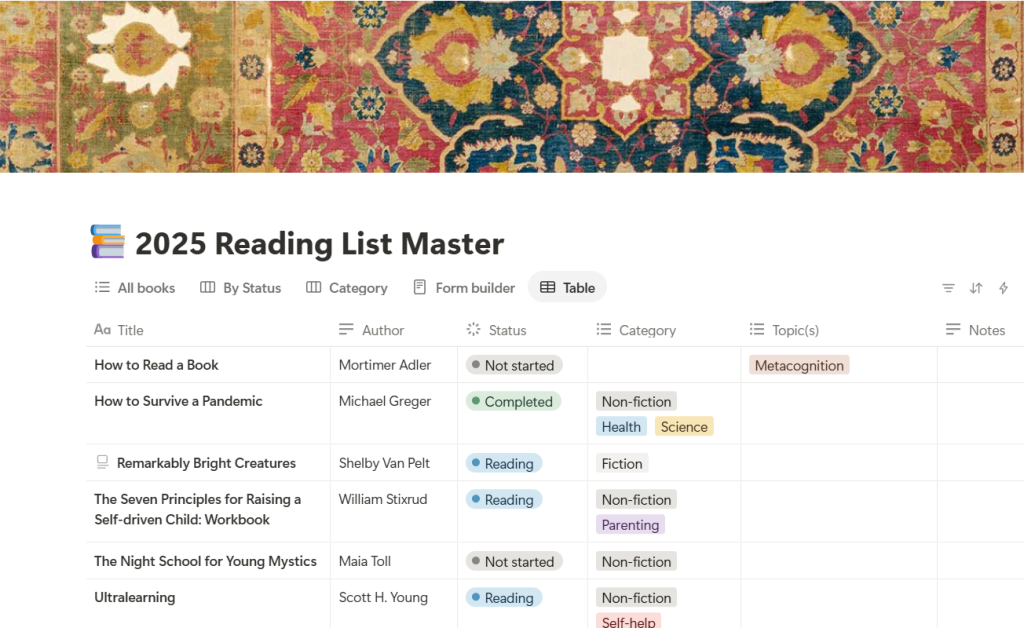
One of Notion’s standout features is its nested pages capability, which I’ve leveraged to create a comprehensive reading management system. Here’s how I organize everything:
- Annual Reading List: I maintain a master database for my yearly reading, currently “2025 Reading List”
- Individual Book Pages: Each book gets its own page containing:
- Basic information (title, author, publication date, ISBN, Page Count)
- Amazon link for reference
- Reading Notes page for detailed analysis
- Book Club Notes page for guided analysis and discussion prep

The Note-Taking Process
My note-taking workflow combines traditional and digital methods:
- Initial capture: I mark interesting passages while reading, and may include marginalia
- Physical processing: For some of my books, I transcribe my annotations into a reading journal, often paraphrasing (rather than direct quotes like in a Commonplace) to enhance retention
- Digital conversion: Using the Notion app on my phone, I open the Book page in my Reading List, create a Reading Notes subpage, and use talk-to-text to narrate my handwritten notes or record notes directly from my book annotations. Notes can be typed in directly as well on all platforms.
- Kindle integration: For e-books, I can import highlights and notes directly into my book pages
Note: While talk-to-text functionality isn’t available on laptops, using mobile devices for this step makes the digitization process quick and efficient.
Zettelkasten Integration
My Notion setup extends beyond simple note storage.
Separate from my Reading List and reading notes, I have implemented a Zettlekasten system for organizing thoughts, ideas, and knowledge sources. I’ll be going into the system in more detail in a later post, but briefly, Zettlekasten (German for ‘slip’ ‘box’) is a knowledge storage system where individual ideas are stored as single notes, developed and refined, and connected to other notes.
Initial notes are Fleeting notes, and as they are refined, and connections to other notes made, these notes are stored as Permanent notes. Literature Notes are a third type of note and contain reading notes from literature sources. Literature Notes are a raw unrefined record from primary sources.
By using Notion to organize each book’s reading notes, I can easily integrate these notes into my Zettlekasten database:
- Book notes can be copied into the Zettlekasten as Literature notes
- Individual ideas can be extracted as Fleeting notes
- Important concepts can be developed into Permanent notes
My journey to Notion fangirl actually started with a search for a way to organize my reading notes and knowledge content. My Notion workspace has since grown to Second Brain status, and I’ll be sharing a lot more about how I utilize the app in future posts.
This system has helped me create a seamless flow between physical reading, digital organization, and knowledge management. It maintains the joy of traditional note-taking while leveraging Notion’s powerful organizational features.
By combining these methods, I’ve created a sustainable system that not only tracks what I read but helps me process and retain information more effectively. Regardless of where you are on the reading note spectrum, this hybrid approach might help you find your own perfect balance.
Check out Notion for yourself.

If you are active over on Threads – I’d love to connect. I’ve just moved over there recently and have enjoyed the conversations on “Bookthreads” – you can find me posting as @michellehomescholar_books.
 Michelle Home Scholar
[…] I’ve become a bit of a Notion nerd of late, and most of my reading notes are managed there (check out how I use Notion for managing my reading notes), but notes can be copied or imported to any document format you […]
LikeLike