

If you have read Tiago Forte’s Building a Second Brain, you will understand what people often mean by the term second brain. Others who write about personal productivity and knowledge work use it too, and it resonates with me.
A second brain is an external system that helps offload some of the mental work required to remember and organize what we read, study, and want to learn. By using an external system to store and organize the information we take in, we free up mental energy to process it, make connections, and synthesize what we are compiling.
Having an external second brain also gives a framework for organizing and retrieving what we have taken in.
For someone like me, with a typically ADHD brain, I have a ton of interests, and I am always reading and studying. I take in a wide variety of resources. But I also have terrible short-term memory.
So over the past year I have been building personal systems to organize my knowledge work. I live surrounded by doom piles, physically and metaphorically. I have stacks of books and magazines, printed articles, reading notebooks, and scraps of paper with ideas and checklists. My computer is even worse.
So what am I organizing and keeping track of?
My reading list
I started using Notion in December 2024. I still recall the panic of looking at that first blank page and wondering what I wanted to use it for.
In January 2025 I started tracking all the books I was reading.
I also use a reading tracker app on my phone called Bookmory. It tracks pages read each day for the current book stack I am working on. It gives me stats and lets me see how I am doing over the course of the month. It’s great and certainly deserves a post of its own.
But I also need a database of books I am reading because of the notes I take.
So in my reading list database, I enter all the books I am currently reading. I have a book template I created so that each book entry includes, at minimum, the author, title, date of publication, genre and descriptive tags, and reading format.
I also try to include publication data like publisher, ISBN, and page count. My Reading List is ultimately being fed into my Personal Library database (more on that later), so I want as much information on hand as possible.
For each book’s page, I can create as many subpages as needed. If I do a deep dive online about the author or the book, I create a subpage with that information.
I usually take notes as I read, and when I transcribe them, I add them as a subpage in the book’s page.
If I write a book review to publish on my blog or for the book club I am part of, that is also a subpage. All content related to the book is contained in the book’s page.
Additionally, I use checkboxes to note whether the book has been reviewed, or whether it is a book I am reading for book club.
This might seem like a lot, but in January 2025 I sat down and tried to think through everything I wanted to track about the books I read, and I built those fields into my book template.
A little work at the beginning has made a world of difference. Now, at the beginning of each month, I enter all the books on my reading list. Then I can add content for each book as I create it.
My reading notes
There are a few ways I do this.
I have previously shared how I can export my notes from Kindle, and when I do, I add them as a notes page for that particular book.
Sometimes I take notes digitally as I read. One of the things I like about Notion is that it is synced across platforms, so I can pull up a book’s page on my phone, open the notes subpage, and dictate my reading notes.
This can be a little cumbersome, though. More often, I highlight or underline in the physical book as I read. Then, when I am finished, I go back through my annotations and dictate them all at once into a Notes subpage.
My “read later” content
I used to use an app called Pocket, which kept track of webpages and articles I came across online but wanted to read later. To my disappointment, they changed gears in 2025 and no longer exist for this purpose. Instead, they send out periodic story roundups.
I still wanted a repository for webpages, online stories, and articles that I came across, to read later.
So I created a database that I call my Pocket Reading List. I save all webpages to read later to this database in the same way I used Pocket, but with the added bonus that it is now in Notion, where I can read, annotate, and move items into my Concept Library if I want to (I’ll get into this in a moment).
Knowledge work
I read about and research a wide variety of topics. I use bookmarks on my computer, but that only marks a website I have visited.
What I need is a way to organize the information I am finding, catalog it, and track my thoughts about what I am reading. I also want to make connections between the different things I am working on.
In Notion, I have created what I call my Syntopicon.
What is the Syntopicon? If you are familiar with The Great Books of the Western World, or if you have read Mortimer Adler’s How to Read a Book, you may recognize the term.
Syntopical reading is the highest and most complex form of reading. It involves multiple books on a single subject for the purpose of comparing, contrasting, and synthesizing their arguments.
So my personal Syntopicon is a database that organizes my research and knowledge work by topic. It is organized in a way that helps me track, organize, and search my notes more easily, and also make connections and synthesize new ideas based on my varied reading.
My Syntopicon has two parts:
- The Concept Library, which is the master database where I enter reading notes, webpages I am annotating, and deep dives into topics I am interested in. Like with my Reading List, I built a page template for each entry. This includes the topic, project or interest tags, and the type of entry.
- Topic pages for the areas of research I work on. Some examples include Autism, Metacognition, Nature and Ecology, Women’s Rights, Languages, and American Politics.
My entries in the Syntopicon are more freestanding.
So my initial reading notes stay with their corresponding books in my Reading List.
As I go through my reading notes, if there is an annotation I want to dig deeper into or pursue as a concept, I send that note to my Concept Library as a standalone page and develop the thought.
For my Topic pages, I have inline databases that show only those items from the Concept Library that are tagged for that topic, so I can focus my attention. I can look through all the notes on a particular Topic page and synthesize new thoughts based on the various resources I have been reading.
I will save a deep dive into my Syntopicon for a later post, but this is a good overview for now.
My writing
I have two blogs:
- Michelle Home Scholar, which focuses on home, garden, food, home administration, and personal scholarship
- The Succulent Brew, a small side project where I focus on more esoteric topics, such as spirituality, tarot, and oracle decks
Each of my websites has corresponding social media accounts where I share content.
Planning and preparing content takes organization, so I use Notion to keep up with planned content for each blog.
I use a database that organizes planned blog and social media posts by status: Not Started, In Progress, and Completed.
I also have a linked calendar view that lets me schedule when I want to post.
For each blog planner entry, I note the topic and project tags, the planned post date, and whether it is a blog post, an Instagram or TikTok post, or a YouTube video.
When I first set up the blog planner, I created a template for each new entry, which makes creating a blog post plan easy.
All writing is done on the entry page, and I can do spell check and editing there before I copy it to Instagram, TikTok, or my blog platform.
I also do writing that is not associated with either blog, and I keep track of it in Notion, too.
For anything related to the book club I participate in, I have a Book Club page where all writing content is contained as subpages.
For other writing, I keep track of it in a Miscellaneous Writing page.
My dashboard
As organized as Notion is, and as easy as it is to search for pages and projects, I need structure.
I built a dashboard: a page that contains links to all my relevant work pages.
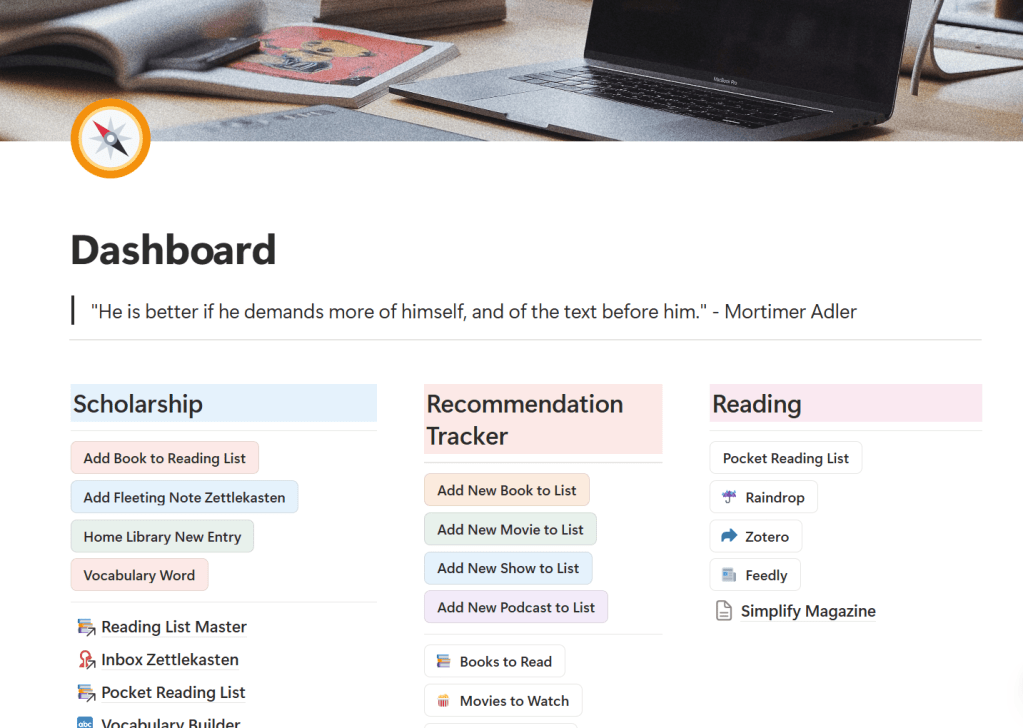
For my knowledge work, I have a section titled Scholarship, where I have my reading pages grouped together. This includes:
- Reading Plan
- Library Catalog
- Pocket Reading List
- Syntopicon
- Science Book Club content
- Vocabulary Builder
In another section titled Writing, I have links to my blog planners, where I do most of my writing.
I also have a Miscellaneous Writing page to capture writing tasks that do not quite fit elsewhere.
I also have a Reading section where I link the websites I visit regularly to keep up with my online reading.
Additionally, I have a Recommendation Tracking section where I manage book, show, movie, and podcast recommendations. When I get a recommendation (or come across one), I add it to my tracker so I can find it easily later.
One thing that makes my dashboard work so well for me is the buttons I have set up.
I use buttons to do a couple of things:
- Some buttons take me directly to a linked website. For example, I can access my Feedly or Zotero pages by clicking a button.
- Other buttons open a form for a particular database. This means I do not need to open a database and manually add a new page.
For example, when I want to add a book title to my Book Recommendation list, I click Add New Book to List. This opens a form I created in my Book Recommendation List.
It prompts me to enter information for a new book. At minimum, I enter the title and author, and submit. This creates a new entry in my Book Recommendation List.
If I have more information, like publication date or a link to purchase, I can add that too.
One feature that makes my Notion system such a good “second brain” is that it pulls together all of the reading, research and notetaking I do, all the writing I am working on, all the things I am trying to remember on a daily basis. It does this in an orderly fashion, and tasks don’t require searching or going through multiple steps – things that have previously derailed me and my attention.
I am getting more accomplished in less time, and find myself able to focus more on my projects and less on finding things or setting up yet another system to try and stay organized. I put in some effort on the front end, designing my templates and databases, and no longer have to think about those details. My efforts are now focused on the actual knowledge work.
I know that coming up with a second brain system (or whatever name works for you!) is a very personal, individual project. Notion could work for you, or you may connect better with something else. I think the key is creating some kind of system that works best for you.
Some relevant links:
Check out Notion
Check out Michelle Home Scholar’s Notion Page
 Michelle Home Scholar